A Google AI Pro workflow experiment: January 2026 notes
Scope: first published January 14, 2026, covering workflow exploration from late 2025 to that date. The September 23 revision corrects quota claims and evidence limits; it does not claim a rerun of the entire workflow on current versions.

This was an experiment in designing an agentic workflow around Google tools. I deliberately limited the available services.
How did this begin?
At the end of 2025, I subscribed to Google AI Pro. I did not initially plan to use only the Google ecosystem. I also subscribed to ChatGPT and Cursor, knew them well, and found both useful.
After spending a lot of time with Antigravity, Gemini CLI, and Jules CLI, a question emerged: if I deliberately limited myself to Google AI Pro and stopped using ChatGPT and Cursor, how far could I actually go?
This was not an experiment in saving money. I wanted to find the real limit of Google's toolchain.
The real Antigravity problem was not product quality
During intensive planning and requirement changes, I encountered quota limits. The original mentioned a five-hour reset without preserving a verifiable account plan, version or screenshot. This September 23, 2026 revision removes that number. Plan around the limits shown in your own account; this historical record is not a current subscription guide.
Repeated iteration interrupted the work in that period. This record has no paired usage logs or per-task costs, so it cannot isolate the responsible component or compare model capabilities.
Why not simply use Cursor or Claude Code?
I was also using other tools at the time. But this experiment imposed a deliberate premise: if Google AI Pro were my only subscription, could I design a workflow that did not keep stopping at a quota wall? That constraint forced me to define the problem more clearly.
The problem was role assignment, not the tools
At first I made several predictable mistakes. I expected Antigravity IDE to do too much, asked Gemini CLI to write code and generate images, and wanted one agent to own the entire job.
The result was predictable too: quota disappeared quickly, the workflow became a black box, and failures had no obvious stopping point. The role boundaries had never been defined.
The design I chose
I redesigned the system as an IDE-first, repository-centered, closed-loop agent workflow and published it as the open-source starter repository keeponfirst-agentic-workflow-starter. It has one central rule: the IDE is for people; the CLI is for the system.
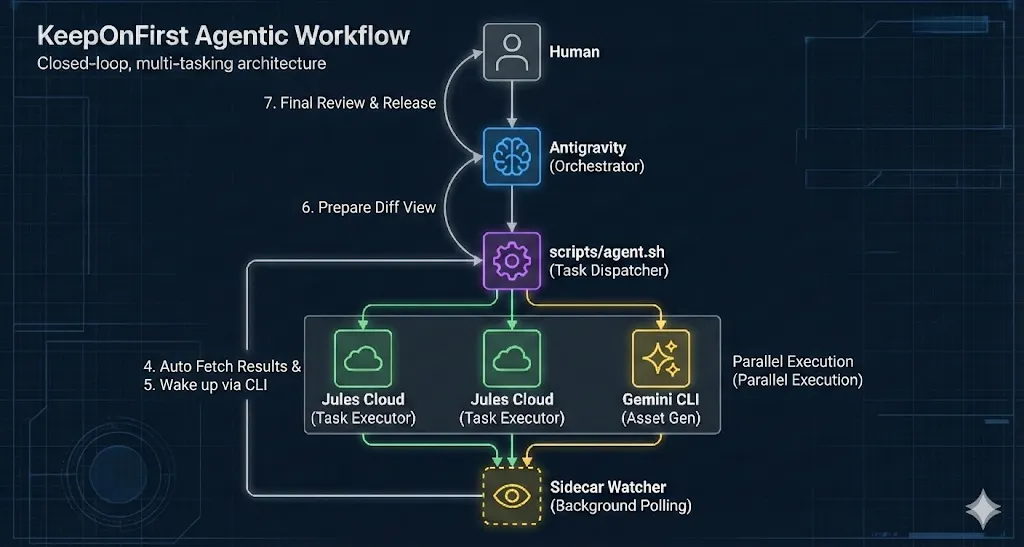
The actual workflow
1. The entry point is always the human-friendly Antigravity IDE. I describe a plan or task in natural language; the IDE is responsible only for planning and producing artifacts.
2. The repository is the central hub. Jules tasks, Gemini image prompts, records, logs, and notes all become files, making the process auditable, replayable, and resumable.
3. In that design, Jules handled heavier development tasks and Gemini CLI was assigned image work. This describes the chosen roles, not the tools’ capability limits. Without before-and-after usage records, it does not demonstrate quota savings.
4. Sidecar and agy form the automated handoff. Sidecar Watcher monitors Jules output and calls agy, the Antigravity CLI, after validation succeeds. If a result is ambiguous or risky, the flow stops and returns control to the IDE for a human decision.
What did the experiment show?
I would not claim that Gemini Pro alone can completely replace Claude Code. I can say that a deliberately designed workflow takes Google AI Pro much farther than I expected, while making it clearer which tasks are suitable for automation and which decisions must remain human.
The unfinished handoff at publication
At the original publication date, the notes described Sidecar Watcher, output checks and an agy callback, but the end-to-end handoff remained incomplete. Launching the IDE did not demonstrate automatic completion of the next task.
At that time the watcher could launch Antigravity, but the Jules result still required manual pasting or confirmation. This describes January 2026; the current agy version was not retested for this revision.
What to record when repeating the experiment
Choose one small task with fixed acceptance criteria. Record the date, plan, tool versions, usage before and after, retries, and manual paste or confirmation steps. Repeat the same scope with another assignment of roles and compare total time and accepted results. This is a proposed evaluation method; this article does not contain that comparative dataset.